
#Part 2 - The Render Pipeline

In Part 1 we opened a window. In this part, we connect that window to the GPU and draw our first frame — a solid colour fill. It’s a modest result, but it means the full rendering pipeline is working end-to-end.
How the GPU Pipeline Works
Before writing code, here’s the mental model you need.
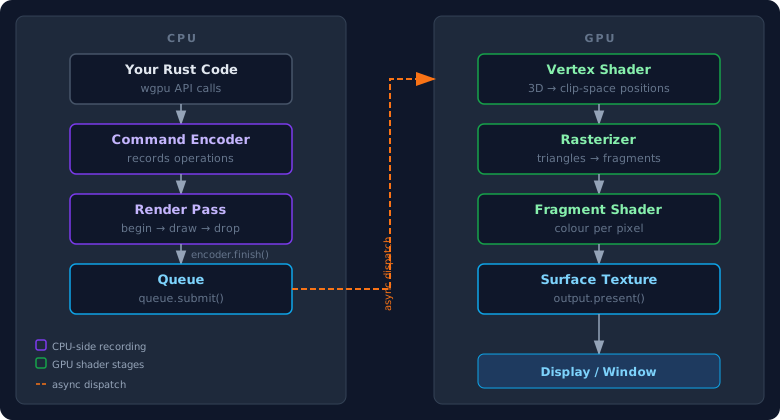
CPU side: recording commands
The CPU never tells the GPU to draw a single pixel directly. Instead it records a list of operations into a command encoder — think of it as building a script to hand off. That script captures one or more render passes, each of which describes what to draw and where to write the results.
When recording is finished, encoder.finish() seals the list and hands it to the queue. queue.submit() dispatches it to the GPU. At that point the CPU is free to move on — the GPU will process the work asynchronously.
GPU side: the pipeline stages
Once the GPU receives the command list, it runs each render pass through a fixed sequence of stages:
- Vertex shader — runs once per vertex in your geometry, transforming 3D positions into 2D clip-space coordinates that map to the screen.
- Rasterizer — converts the triangles formed by those vertices into a grid of fragments, one per pixel the triangle covers.
- Fragment shader — runs once per fragment, deciding its final colour. This is where lighting, textures, and effects happen.
- Surface texture — the coloured fragments are written into a texture (a block of GPU memory). When the frame is complete,
output.present()hands that texture to the OS compositor to display in the window.
In this part we have no geometry yet, so vertex and fragment shaders are skipped — the render pass just clears the texture to a solid colour. The shader stages appear in Part 3 when we draw our first triangle.
The wgpu objects you’ll create
| Object | What it is |
|---|---|
Instance | Entry point to wgpu; discovers GPUs on the system |
Surface | The window’s drawable area |
Adapter | A handle to a specific GPU that can render to the surface |
Device | An open connection to the GPU |
Queue | Where you submit command lists |
SurfaceConfiguration | Tells the surface its size, format, and presentation mode |
The State Struct
wgpu initialisation is async and produces several objects that all need to live for the duration of the program. We put them in a State struct so we can pass them around together.
// Top of main.rs — replaces Part 1's imports. We now also need
// Arc for shared ownership and the Window type itself.
use std::sync::Arc; // Arc = Atomically Reference Counted pointer: lets several owners share one Window

use winit::{
    event::{Event, WindowEvent},
    event_loop::{ControlFlow, EventLoop},
    window::{Window, WindowBuilder},
};

// New — add directly below the imports.
// `<'window>` is a lifetime parameter. It ties this struct's validity to
// the window's, so the compiler guarantees State can never outlive it.
struct State<'window> {
    surface: wgpu::Surface<'window>,     // the window region the GPU draws into
    device: wgpu::Device,                // open logical connection to the GPU
    queue: wgpu::Queue,                  // where we submit recorded command lists
    config: wgpu::SurfaceConfiguration,  // surface size, format, and present mode
    size: winit::dpi::PhysicalSize<u32>, // current window size in physical pixels
    window: Arc<Window>,                 // shared handle to the OS window
}
The 'window lifetime tells Rust that State must not outlive the window it renders into — a safety guarantee the compiler enforces for us.
Initialising wgpu
// New — add directly below the State struct. Note the impl block
// stays open: resize() and render() join it in the next section.
impl<'window> State<'window> {
    // `async` because requesting a GPU adapter and device talks to the OS
    // graphics driver and may take time. Returns a fully built State.
    async fn new(window: Arc<Window>) -> State<'window> {
        let size = window.inner_size(); // current size in physical pixels

        // The Instance is wgpu's entry point — it discovers the GPUs on the
        // machine. Backends::all() means try every backend (Vulkan, Metal,
        // DX12, …) and use whichever is available.
        let instance = wgpu::Instance::new(wgpu::InstanceDescriptor {
            backends: wgpu::Backends::all(),
            // Fill the remaining fields from a sensible baseline. We don't
            // have a raw display handle here, so use this constructor.
            ..wgpu::InstanceDescriptor::new_without_display_handle()
        });

        // The surface is the drawable area of our window. `unwrap()` panics
        // if creation fails — acceptable for a learning project.
        let surface = instance.create_surface(window.clone()).unwrap();

        // An adapter is a handle to one physical GPU. We ask for one that can
        // render to our surface. `.await` yields until the request resolves;
        // `.unwrap()` panics if no suitable GPU is found.
        let adapter = instance
            .request_adapter(&wgpu::RequestAdapterOptions {
                power_preference: wgpu::PowerPreference::default(),
                compatible_surface: Some(&surface), // must be able to draw to our window
                force_fallback_adapter: false,      // don't force the software renderer
            })
            .await
            .unwrap();

        // Opening the device gives us the Device (for creating GPU resources)
        // and the Queue (for submitting work). The returned tuple is
        // destructured into two variables in a single line.
        let (device, queue) = adapter
            .request_device(&wgpu::DeviceDescriptor {
                label: None,                                // optional debug label
                required_features: wgpu::Features::empty(), // no extra GPU features
                required_limits: wgpu::Limits::default(),   // default resource limits
                memory_hints: wgpu::MemoryHints::default(), // let wgpu choose allocation strategy
                experimental_features: wgpu::ExperimentalFeatures::disabled(), // no experimental APIs
                trace: wgpu::Trace::Off,                    // no API call tracing
            })
            .await
            .unwrap();

        // Query what the surface supports, then prefer an sRGB colour format
        // so colours display correctly. `find` returns the first sRGB format;
        // `unwrap_or` falls back to the first listed format if none is sRGB.
        let surface_caps = surface.get_capabilities(&adapter);
        let surface_format = surface_caps
            .formats
            .iter()
            .copied()
            .find(|f| f.is_srgb())
            .unwrap_or(surface_caps.formats[0]);

        // Describe how the surface should behave: it's a render target, it
        // matches the window size, and it uses the format/modes we chose.
        let config = wgpu::SurfaceConfiguration {
            usage: wgpu::TextureUsages::RENDER_ATTACHMENT, // we render into it
            format: surface_format,
            width: size.width,
            height: size.height,
            present_mode: surface_caps.present_modes[0], // e.g. vsync
            alpha_mode: surface_caps.alpha_modes[0],
            view_formats: vec![],
            desired_maximum_frame_latency: 2,
        };

        surface.configure(&device, &config); // apply the configuration

        // Build and return the struct. Rust returns the final expression (no
        // trailing semicolon). The field names match the local variables, so
        // we use the shorthand instead of writing `surface: surface, …`.
        State { surface, device, queue, config, size, window }
    }
We request an adapter compatible with our surface, then open a Device and Queue from it. The SurfaceConfiguration tells wgpu the pixel format, size, and how to time frame presentation.
Resize and Render
    // Still inside `impl State` — add both methods below new().
    // `&mut self` because resizing mutates the stored size and config.
    fn resize(&mut self, new_size: winit::dpi::PhysicalSize<u32>) {
        // Guard against a zero-sized surface (e.g. when minimised), which is
        // invalid and would make the GPU error.
        if new_size.width > 0 && new_size.height > 0 {
            self.size = new_size;
            self.config.width = new_size.width;
            self.config.height = new_size.height;
            self.surface.configure(&self.device, &self.config); // re-apply at the new size
        }
    }

    // Draws one frame. Returns nothing — acquiring the surface texture gives
    // back an enum we match on, handling each outcome inline.
    fn render(&mut self) {
        // get_current_texture() returns a CurrentSurfaceTexture enum. We pull
        // the texture out of the usable variants and bail early on the rest.
        let output = match self.surface.get_current_texture() {
            wgpu::CurrentSurfaceTexture::Success(texture)
            | wgpu::CurrentSurfaceTexture::Suboptimal(texture) => texture,
            // Transient conditions (minimised, timed out) — skip this frame.
            wgpu::CurrentSurfaceTexture::Timeout
            | wgpu::CurrentSurfaceTexture::Occluded => return,
            // Surface needs reconfiguring — re-apply the current config, then skip.
            wgpu::CurrentSurfaceTexture::Outdated
            | wgpu::CurrentSurfaceTexture::Lost => {
                self.surface.configure(&self.device, &self.config);
                return;
            }
            wgpu::CurrentSurfaceTexture::Validation => return,
        };
        // A view is the handle render passes use to access the texture's memory.
        let view = output.texture.create_view(&wgpu::TextureViewDescriptor::default());

        // The encoder records GPU commands on the CPU side before they're
        // submitted. `mut` because recording into it mutates it.
        let mut encoder = self.device.create_command_encoder(
            &wgpu::CommandEncoderDescriptor { label: Some("Render Encoder") }
        );

        // Inner scope: the render pass borrows `encoder`. Dropping it at the
        // end of this block releases that borrow so we can call
        // encoder.finish() afterwards.
        {
            let _render_pass = encoder.begin_render_pass(&wgpu::RenderPassDescriptor {
                label: Some("Render Pass"),
                color_attachments: &[Some(wgpu::RenderPassColorAttachment {
                    view: &view,          // write the results into our surface texture
                    resolve_target: None,
                    ops: wgpu::Operations {
                        // Clear the whole texture to this colour at the start
                        // of the pass (RGBA on a 0–1 scale)…
                        load: wgpu::LoadOp::Clear(wgpu::Color { r: 0.1, g: 0.2, b: 0.3, a: 1.0 }),
                        store: wgpu::StoreOp::Store, // …and keep the result in the texture
                    },
                    depth_slice: None, // 2D target, so no depth slice
                })],
                depth_stencil_attachment: None,
                occlusion_query_set: None,
                timestamp_writes: None,
                multiview_mask: None,
            });
        } // _render_pass dropped here, releasing its borrow of `encoder`

        // Finish recording and submit the command list to the GPU queue.
        // `std::iter::once` wraps our single command buffer in an iterator.
        self.queue.submit(std::iter::once(encoder.finish()));
        output.present(); // hand the finished texture to the OS to display
    }
} // closes the impl State block opened in the previous section
The inner block around _render_pass matters: encoder.finish() can only be called after the render pass is dropped. Rust’s ownership rules enforce this — if you try to call finish() while the pass is still alive, the compiler refuses to compile.
Wiring Up main
// Replaces the whole main() function from Part 1 — it goes at the
// bottom of the file, after the closing brace of impl State.
fn main() {
    env_logger::init(); // route wgpu's internal logging through env_logger
    let event_loop = EventLoop::new().unwrap(); // the OS event loop
    event_loop.set_control_flow(ControlFlow::Poll); // keep looping even with no events (for animation)

    // Build the window and wrap it in an Arc so that both State and the event
    // loop closure below can share ownership of it.
    let window = Arc::new(
        WindowBuilder::new()
            .with_title("Graphics with wgpu")
            .with_inner_size(winit::dpi::LogicalSize::new(800u32, 600u32))
            .build(&event_loop)
            .unwrap(),
    );

    // State::new is async; block_on drives it to completion on this thread so
    // main can stay an ordinary, non-async function.
    let mut state = pollster::block_on(State::new(window.clone()));

    // run() takes ownership of `state` (via `move`) and calls this closure for
    // every event. `elwt` is the event-loop target, used here to exit.
    event_loop.run(move |event, elwt| match event {
        // Only handle events belonging to our window.
        Event::WindowEvent { event, window_id } if window_id == state.window.id() => {
            match event {
                WindowEvent::CloseRequested => elwt.exit(), // user closed the window
                WindowEvent::Resized(physical_size) => state.resize(physical_size),
                // render() handles surface errors internally now, so we just call it.
                WindowEvent::RedrawRequested => state.render(),
                _ => {} // ignore all other window events
            }
        }
        // Fires once every pending event is handled — request the next frame.
        Event::AboutToWait => state.window.request_redraw(),
        _ => {} // ignore non-window events
    }).unwrap();
}
pollster::block_on runs the async State::new synchronously so main stays a normal function. AboutToWait fires after all pending events are processed — the right time to request the next frame.
Running It
cargo run
You should see a dark blue-grey window. The colour (0.1, 0.2, 0.3) is RGB on a 0–1 scale. Try changing the values and rerunning to see the colour change.
What’s Next
In Part 3 we draw our first triangle — the “hello world” of graphics programming. That’s where we write our first shaders.
Further reading:
- Scope and Ownership in Rust — the
'windowlifetime andArc<Window>are both ownership concepts - Part 1 — Project Setup
FAQ
What is a render pass in wgpu? A render pass is a recording of GPU draw operations that all write to the same set of textures. You begin it, record draw calls into it, then drop it — at which point the commands are finalised in the encoder.
Why is wgpu initialisation async?
Requesting an adapter and device involves querying the OS graphics layer, which can take time. wgpu exposes this as async so applications can initialise the GPU without blocking a thread. pollster::block_on lets us run it synchronously from main.
What does a lost or outdated surface mean in wgpu?
It means the surface became invalid — usually because the window was minimised or resized mid-frame. get_current_texture() reports this as the Lost or Outdated variant, and render() reconfigures the surface and skips the frame.
Why wrap Window in Arc?
Both State and the event loop closure need to hold a reference to the window. Arc (atomically reference-counted pointer) allows shared ownership without copying the window.
Continue Learning
Part 6 - 2D Transformations
Move, rotate, and scale objects in wgpu using transformation matrices with glam — pass a 4×4 matrix as a uniform to the vertex shader and animate it each frame.
Part 5 - Textures and Image Loading
Load an image file and render it as a texture on a quad with wgpu in Rust — covers texture creation, samplers, UV coordinates, and index buffers.
Part 4 - Colors and Uniforms
Learn how to pass data from your Rust program to the GPU using uniform buffers and bind groups in wgpu — and animate a colour tint in real time.
Part 3 - Drawing Your First Triangle
Draw your first triangle with wgpu in Rust — define vertex data, upload it to the GPU with a vertex buffer, and write your first WGSL shaders.